Developer Mode takes your app. It gives you back the printer.
Putting a Bambu X1C in LAN Developer Mode costs you the phone app, the cloud history, and one-click MakerWorld. What you get in exchange is three open ports — and, if you build on them, a print dialog that any application can call.
Turning on LAN-only + Developer Mode is presented as a settings toggle. It is closer to a trade, and it is worth being honest about which side of it hurts.
What you give up. Remote monitoring and control from outside your house. Sending a plate straight from the slicer through the cloud. One-click printing from the model library. Push notifications when a print finishes or fails. The cloud-side print history. And — the part people underestimate — a polished first-party app that someone else maintains, tests, and ships to your phone for free.
That is a real loss. Anyone who tells you it isn’t hasn’t used the app.
What you get. Three ports.
| Port | Protocol | What it carries |
|---|---|---|
| 8883 | MQTT over TLS | full status push, and every write verb |
| 322 | RTSPS | the chamber camera |
| 990 | FTPS | job upload to the printer’s SD card |
That looks like a downgrade. It is the opposite, and the rest of this post is the argument for why — plus the ceiling we hit, which is real and which we have not gotten past.
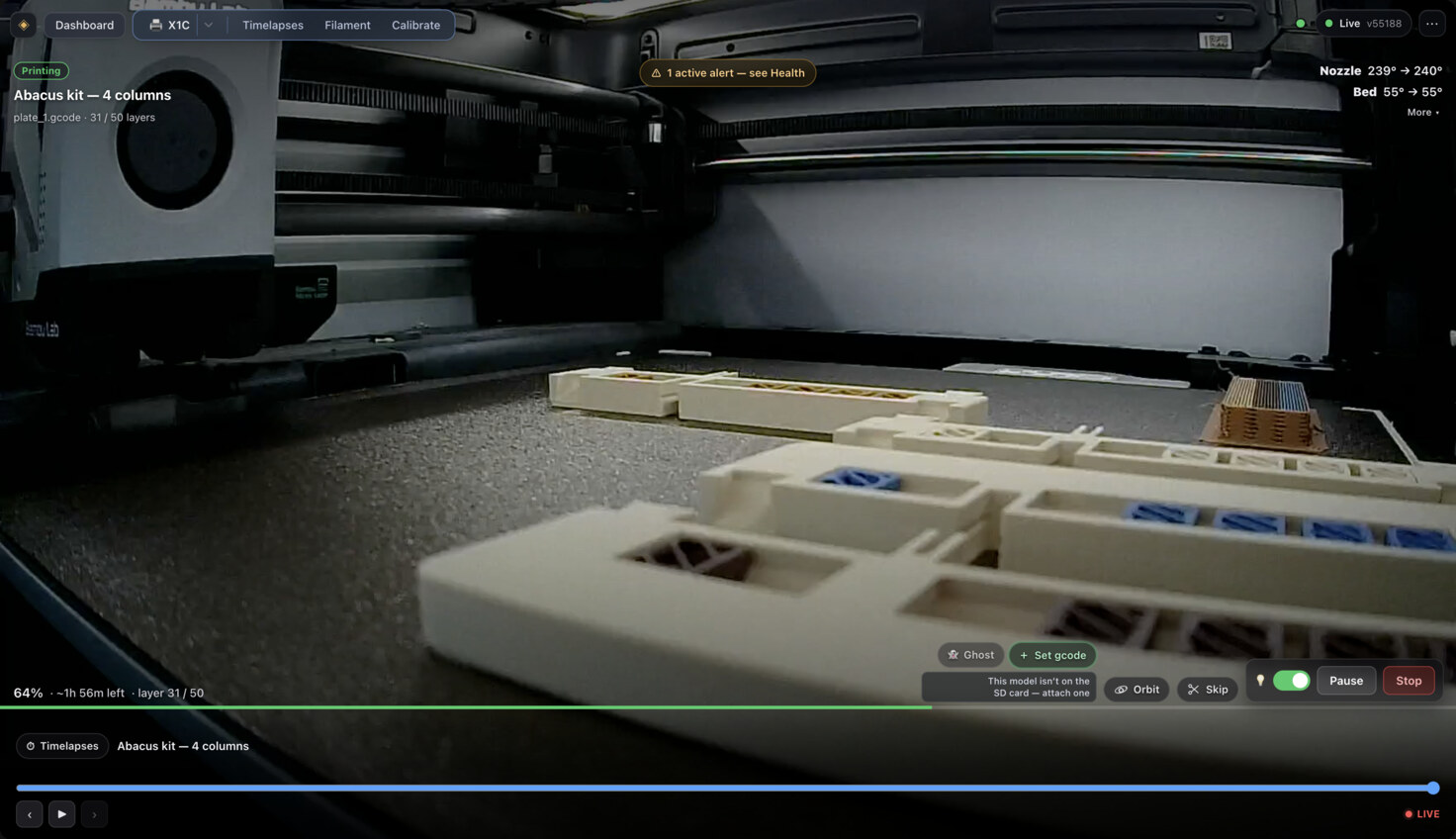
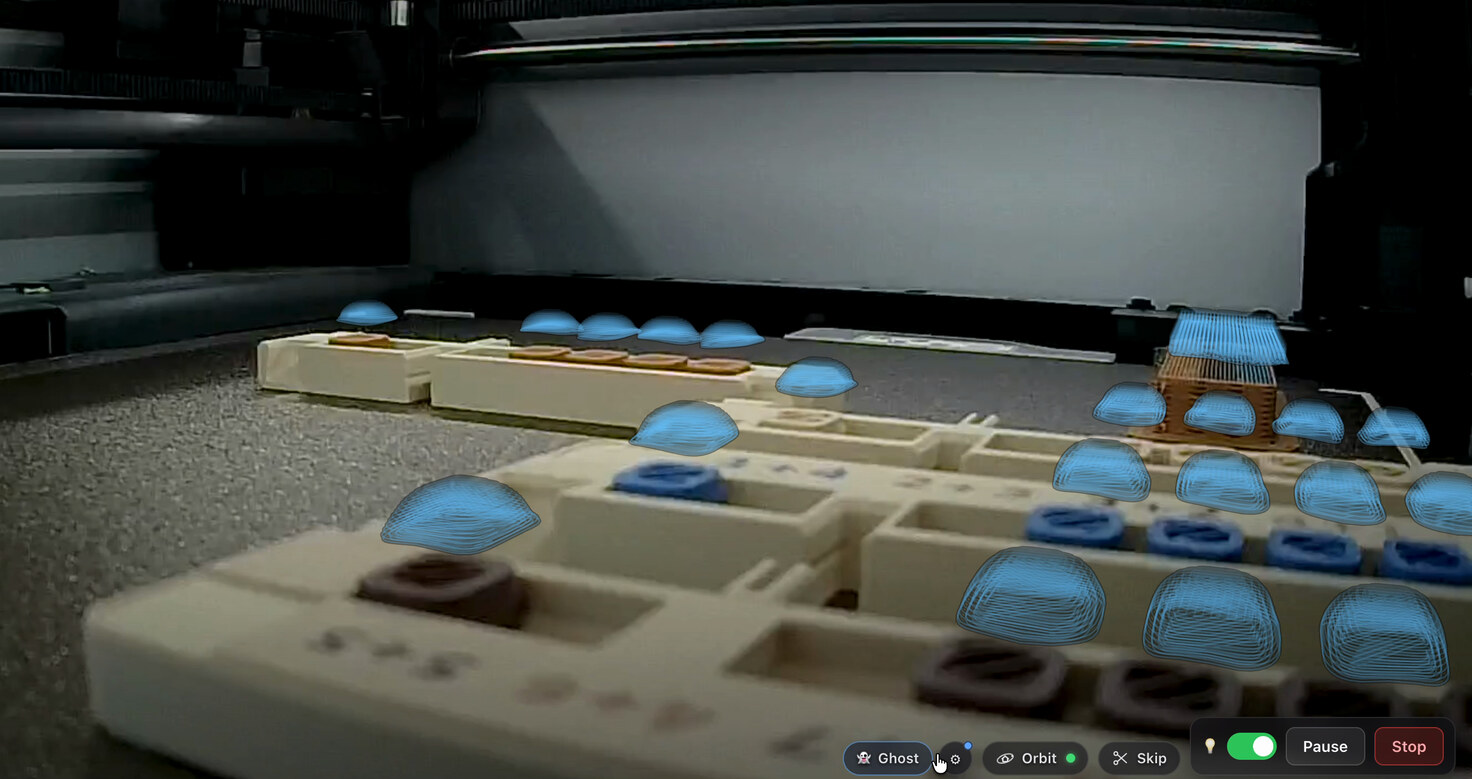
What replaces the app: an X1C at layer 31 of 50 — camera, telemetry and controls, all off those three ports, none of it touching a cloud. That the parts on the bed are an abacus turns out not to be a coincidence.
The ports are not a consolation prize
The first thing worth establishing is that this interface is complete enough to build on, because a lot of writing on the subject assumes it isn’t.
We verified this against our own X1C rather than trusting the folklore. Under
LAN-only + Developer Mode, in 2026, a plain paho-mqtt client authenticating
as bblp with the access code gets: full telemetry — temperatures, progress,
layer_num, AMS slot contents, gcode_state, print_error, HMS codes —
plus print.stop / pause / resume, chamber light control, AMS filament
load and unload, and AMS-mapped print starts.
Two beliefs we went in with turned out to be wrong, and both were load-bearing:
- “Post-2025 LAN commands must be RSA-signed.” Refuted. Request signing applies to default LAN mode with authorization on. Developer Mode is specifically the escape hatch, and it leaves MQTT, the live stream, and FTP open. No signing shim is required. Our raw client works.
- “Home Assistant lost printer control in the update.” Refuted. Monitoring was never affected; control needs LAN + Developer Mode, which is the same door everything else uses.
The printer’s status pushes are partial — you get deltas and have to
deep-merge them into a full state document yourself, with pushall to request
a fresh snapshot. That is the single biggest thing that makes naive
integrations flaky, and it is why the design below starts where it does.
This is the 1990s printer problem, and it already has an answer
Paper printers used to work exactly the way 3D printers work now. Every vendor shipped its own application. You wanted to print from a program, that program had to know about your specific printer. Printing was a feature of an app.
Then it inverted. IPP and CUPS turned the printer into a service: it publishes a capability document describing what it can do, you submit a job ticket describing what you want, and the service owns everything in between. The immediate consequence is that printing stopped being a feature of one program and became File → Print in all of them.
3D printing is pre-inversion. The vendor app is the only real client, and every integration is a bespoke reach into someone’s cloud.
So the Bambu app is not the thing you lost. The Bambu app is the thing you were stuck with. Developer Mode is the door out, and what’s on the other side is worth more than what you handed over — but only if you build the service layer that IPP built for paper. That’s what things.haunt.house is.
The design, in one constraint
The X1C tolerates very few concurrent MQTT sessions, and the camera has a single slot. Every naive design — each browser tab opens its own connection — falls over immediately, and worse, does so intermittently.
So: one gateway owns the single MQTT connection and is the source of truth. It holds the merged state document, applies incoming partial pushes, and fans deltas out to clients over WebSocket. The UI is a client of the gateway. The API is a client of the gateway. Nothing else ever speaks MQTT to the printer. That one decision is what makes everything after it possible.
Three things fell out of it that the cloud app cannot do:
A camera you can scrub by layer. The X1C’s stream is not seekable — the
printer keeps no buffer to rewind. “Go back and look at layer 340” only exists
if you record it yourself. The gateway is the only component that sees both the
video and layer_num, so it tees one JPEG per layer increment into a
layer-indexed store. The result isn’t a livestream with a scrubber bolted on;
it’s a print timeline, with chapter markers at pauses, resumes, filament
swaps, and HMS events. The recording and the timelapse are the same artifact.
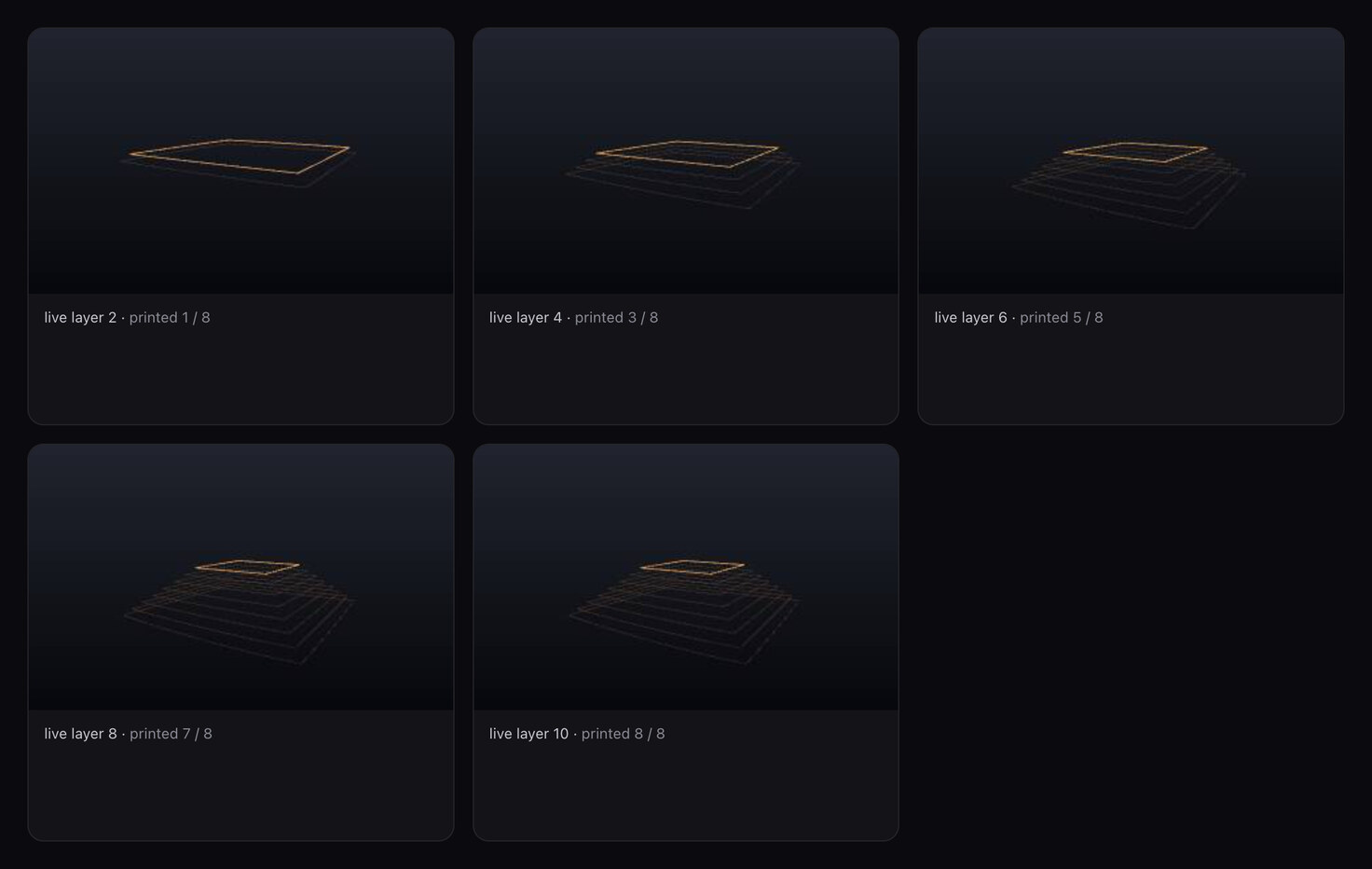
Because every frame is filed under a layer number, “layer 6” is an address rather than a timestamp. Rendered here in Storybook against synthetic telemetry.
A print API. /api/print/v1: you send a raw 3MF and a sparse job ticket,
and the service owns preflight, slicing, FTPS staging, the MQTT start, and
progress. It publishes a capability document — every settings key at the pinned
slicer version, annotated with what you’re allowed to write — which is the
direct Get-Printer-Attributes analog. Clients render that document. They
never hard-code a key list, so the vocabulary can grow without breaking them.
Printers that don’t exist. The fakes speak the real wire protocol — MQTT-over-TLS, FTPS, RTSPS — on a private network, so the gateway connects to them exactly as it would to hardware. The whole print loop is developable and testable with no printer in the room and nothing at risk.
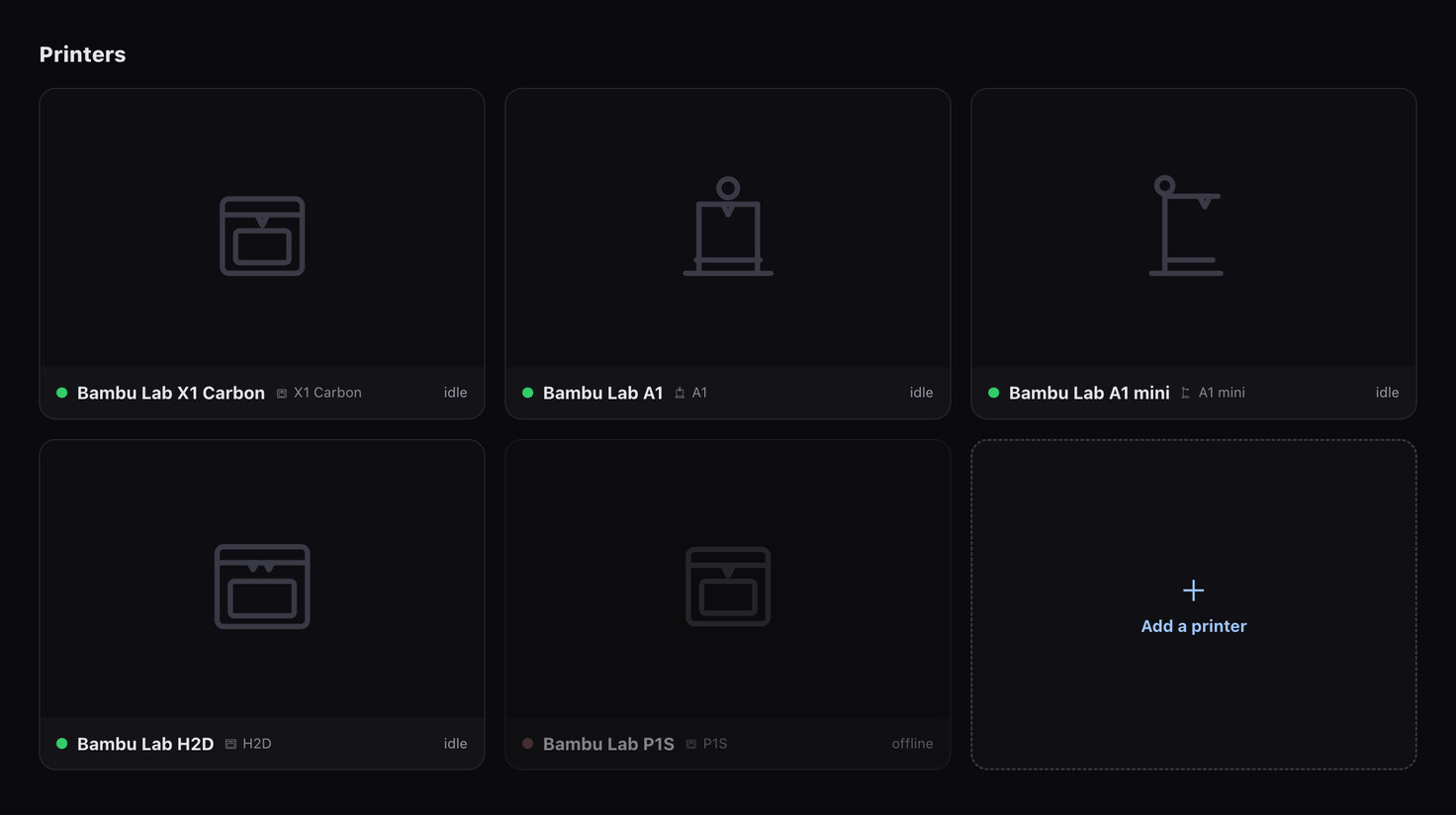
A five-machine fleet, including one conveniently offline. None of these printers exist; this is a Storybook story. That is the point — the offline state is as easy to develop against as the happy path.
Seeing the print from an angle the camera isn’t at
A single camera bolted inside the chamber, which never moves, sounds like the least interesting sensor in the machine. It becomes the most interesting one the moment the same process is also holding the gcode.
Calibrate the two into a shared coordinate frame — a printed ArUco target observed across a sweep of bed heights, solved once, reused forever, because the camera is bolted down — and the video stops being video. Every pixel now has a known place on the build plate, and the model has a known place in the picture.
Ghost draws the part you have not printed yet. The overlay is the sliced model’s un-printed remainder, registered through that calibration so it stands exactly where the plastic is about to go: real pixels below the nozzle, hologram above it, and the seam descending layer by layer as the print climbs into the space the ghost was occupying. Near the print head the solid crossfades down into its own toolpath — the idealized surface dissolving into the lines that are about to become it.
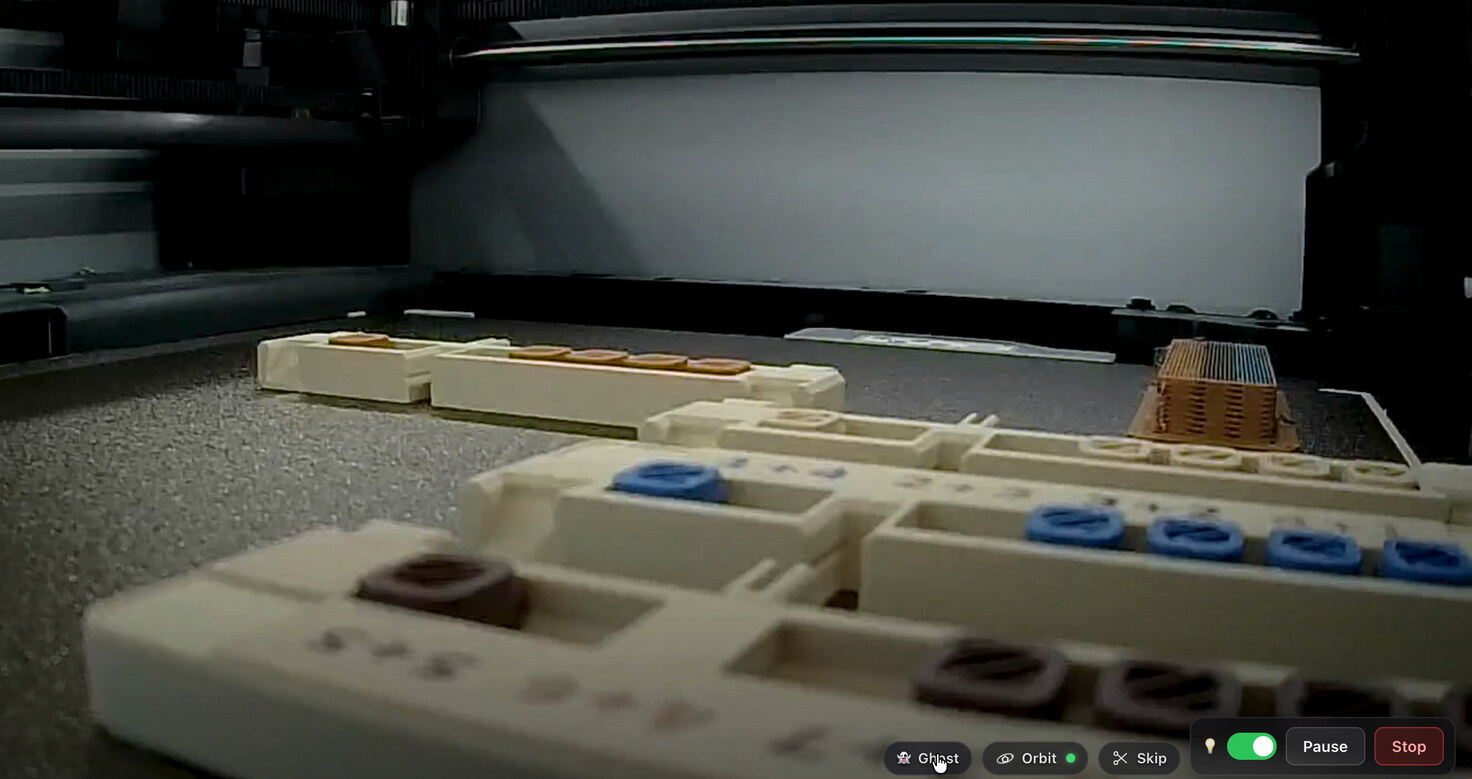
Orbit takes the view off the camera. You drag on the build plate and the scene rotates away from the fixed chamber angle, except the printed material keeps the real photograph skinned onto it. You are not looking at a render of your print. You are looking at a photograph of it, from a position no camera occupies.
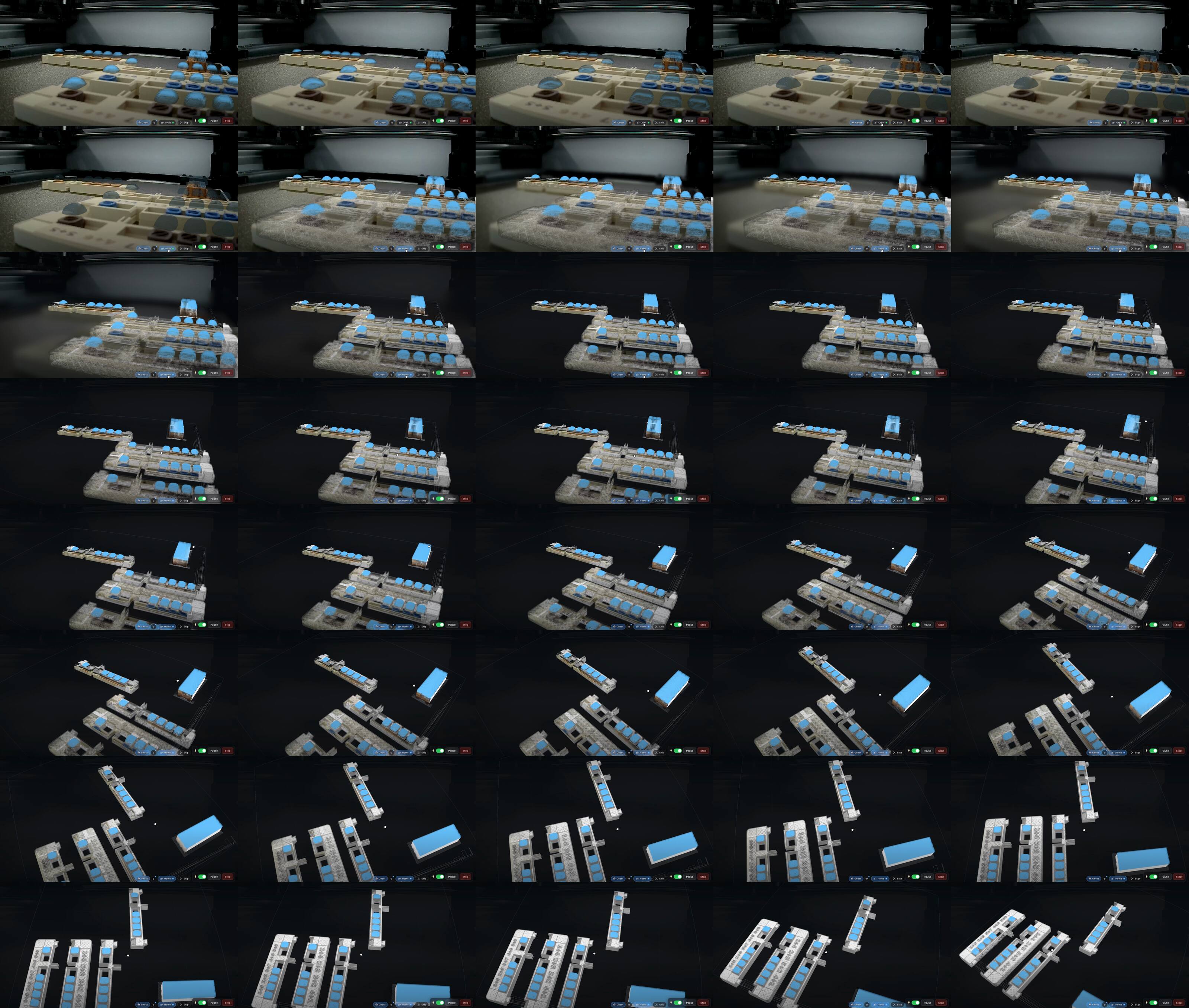
Both of these run in the browser, and neither uses three.js — which sounds like
a preference and isn’t. A fisheye lens projects as r → atan(r) → θ-poly, and
that is not a 4×4 matrix, so a pinhole camera cannot express it at any setting.
The projection is a hand-written GLSL port of the calibration’s own lens model.
Orbit’s virtual camera is a fisheye clone of the real one, which is why
orbiting back to the home position lands pixel-identical to the chamber view
rather than approximately near it. Occlusion needs the same treatment: the
depth pass renders into a fisheye shadow map, because a light-space matrix
can’t express the lens either.
The limits are worth stating. Orbit is X1C-only today, with a 256 mm bed hardcoded in several places that have to move together. Pitch clamps at ±85°, so there is no true top-down. And the back of your print — material the real camera never saw — is drawn as flat filament-coloured plastic rather than invented. The code names that variable honestly: it is actual plastic, not photographed. A view that fabricated the unseen side would look better and mean less.
None of this is reachable from a phone app talking to a cloud, and not because the app is badly built. It needs the camera, the gcode, and the calibration to be owned by one process at the same instant. That is an architecture, not a feature.
The part that actually matters
Here is the diagram that makes the case better than any feature list:
graph LR
  A["Abacus Studio<br/>(abaci.one)"] --> P["@eink/print-dialog"]
  B["Frame Studio<br/>(e-paper frames)"] --> P
  C["CLI · agents ·<br/>your app"] --> P
  P --> S["things.haunt.house<br/>/api/print/v1"]
  S --> X["X1C over<br/>MQTT · FTPS · RTSPS"]
@eink/print-dialog is a published package: the types for the capability
document and the job ticket, plus a transport client. It is deliberately
service-neutral — no host, no topology, no slicer name, not even a printer
brand appears anywhere in it. That constraint is mechanically enforced in CI
rather than left to discipline.
Two applications already print through it. One is a soroban learning platform that designs a physical abacus. The other is an e-paper photo frame studio that designs an enclosure. They were built for unrelated reasons by unrelated code paths, and neither of them knows what a Bambu is. They speak capability documents and job tickets, the same way a word processor speaks IPP and doesn’t know what a Brother laser is.
That is the whole return on the trade. You gave up an app. You got a printer that any of your software can print to — including software that doesn’t exist yet, written by people who will never read the Bambu MQTT protocol notes.
The ceiling we did not get past
House rule: publish the limit.
We wanted a shared AMS that could roam between printers. Three of the four steps are commandable over stock LAN MQTT — retract, bus switch (hardware, ours to build), and load on the new printer. The fourth is not. There is no software command to make a printer re-detect an AMS without a reboot. It is absent from every client library and from the reverse-engineered protocol notes; RFID re-reads fire only on printer restart or physical filament insertion.
The most promising candidate was an undocumented reset parameter on
ams_control. We fired it at the live printer with the AMS connected and
loaded. The printer answered err_code 0 / result SUCCESS about 114 ms after
publish — so it is a real, recognized, non-destructive command reachable over
plain LAN MQTT, which independently confirms the no-signing finding above. It
also did nothing: both modules stayed in get_version across three polls,
ams_exist_bits held, filament stayed loaded, zero new HMS entries.
Accepted, and inert.
So the seamless no-reboot handoff is not confirmed on stock firmware. The honest fallbacks are tolerating a power cycle between owners, or a hardware shim that simulates a clean reconnect — and we found no evidence that an off-the-shelf emulator for the classic X1C RS485 AMS exists. Two claims we wanted to be true went 0–3 against the evidence.
The ceiling stands. We’d rather say so than let you discover it yourself at 2 a.m.
Where this goes
The interesting question isn’t whether a self-hosted control panel can match a polished first-party app. Feature-for-feature, for a while, it won’t.
The interesting question is what you build once printing is something your software can call. A design tool that hands you a finished part instead of a download. A monitoring agent that pauses on a failure cue. A frame studio where “print this enclosure” is a button and not a twelve-step export.
None of that is reachable through a phone app, no matter how good the phone app is. All of it is reachable through three open ports and a service that turns them into a print dialog.
If you’re running a printer in Developer Mode and you’ve been treating it as a loss — what would you print, if any of your programs could just print?